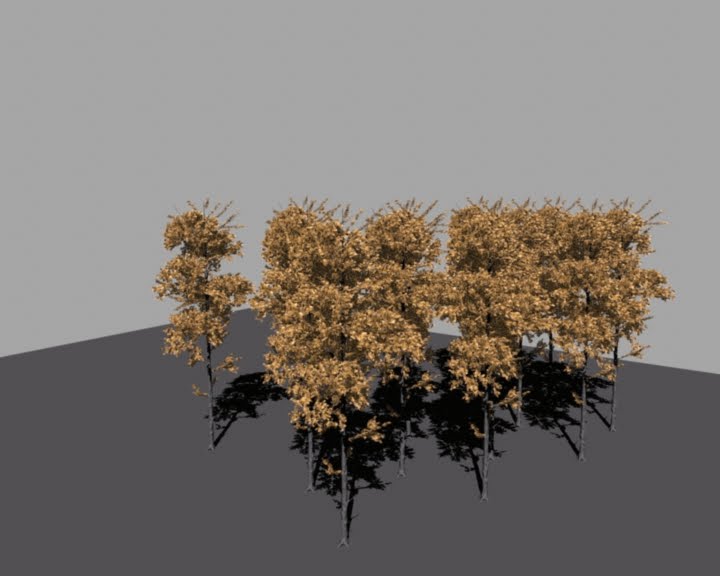
Saturday, 30 April 2011
Thursday, 21 April 2011
lighting trees
top no transparency on leaves.
bottom with transparency.
both with leaves cut out to allow light through in patches.
thoughts?
Tuesday, 5 April 2011
Backup :~
int $i;
// the starting TreeType1Proxy
int $treeNum = 103;
for($i=1; $i<=1035; ++$i)
{
// create a new locator and point constraint it to a PlaceholderTree.
spaceLocator -p 0 0 0;
eval("select -r PlaceholderTree" + $i);
eval select -add locator1;
doCreatePointConstraintArgList 1 { "0","0","0","0","0","0","0","1","","1" };
pointConstraint -offset 0 0 0 -weight 1;
// get the x, y, z coords for the locator. Set these to proxyTx, proxyTy and proxyTz variables.
float $proxyTx = eval("getAttr locator1.tx");
float $proxyTy = eval("getAttr locator1.ty");
float $proxyTz = eval("getAttr locator1.tz");
// generate a "random" number for use as the y axis rotation for the new tree
float $randomRot = rand(0 - 360);
// duplicate the last tree
eval("duplicate TreeType1Proxy__" + $treeNum);
// increment treeNum to the duplicated tree
++$treeNum;
// select the new tree and then move this to the position of the locator and rotate the in the y axis
eval("select TreeType1Proxy__" + $treeNum);
move $proxyTx $proxyTy $proxyTz;
rotate -p 0 $randomRot 0;
// delete the locator
delete locator1;
}
int $a;
int $i = 1;
for($a=1; $a<=21; ++$a)
{
select -r EnvGroundTarget EnvGroundFlat ;
blendShape -frontOfChain;
int $j;
eval("select -r PlaceholderTree" + $i);
++$i;
for($j=1; $j<=49; ++$j)
{
eval("select -tgl PlaceholderTree" + $i);
++$i;
}
select -tgl EnvGroundFlat;
CreateWrap;
setAttr "blendShape1.EnvGroundTarget" 1;
DeleteHistory;
setAttr "blendShape1.EnvGroundTarget" 0;
DeleteAllHistory;
file -force -save -options "v=0";
}
quit()
// the starting TreeType1Proxy
int $treeNum = 103;
for($i=1; $i<=1035; ++$i)
{
// create a new locator and point constraint it to a PlaceholderTree.
spaceLocator -p 0 0 0;
eval("select -r PlaceholderTree" + $i);
eval select -add locator1;
doCreatePointConstraintArgList 1 { "0","0","0","0","0","0","0","1","","1" };
pointConstraint -offset 0 0 0 -weight 1;
// get the x, y, z coords for the locator. Set these to proxyTx, proxyTy and proxyTz variables.
float $proxyTx = eval("getAttr locator1.tx");
float $proxyTy = eval("getAttr locator1.ty");
float $proxyTz = eval("getAttr locator1.tz");
// generate a "random" number for use as the y axis rotation for the new tree
float $randomRot = rand(0 - 360);
// duplicate the last tree
eval("duplicate TreeType1Proxy__" + $treeNum);
// increment treeNum to the duplicated tree
++$treeNum;
// select the new tree and then move this to the position of the locator and rotate the in the y axis
eval("select TreeType1Proxy__" + $treeNum);
move $proxyTx $proxyTy $proxyTz;
rotate -p 0 $randomRot 0;
// delete the locator
delete locator1;
}
int $a;
int $i = 1;
for($a=1; $a<=21; ++$a)
{
select -r EnvGroundTarget EnvGroundFlat ;
blendShape -frontOfChain;
int $j;
eval("select -r PlaceholderTree" + $i);
++$i;
for($j=1; $j<=49; ++$j)
{
eval("select -tgl PlaceholderTree" + $i);
++$i;
}
select -tgl EnvGroundFlat;
CreateWrap;
setAttr "blendShape1.EnvGroundTarget" 1;
DeleteHistory;
setAttr "blendShape1.EnvGroundTarget" 0;
DeleteAllHistory;
file -force -save -options "v=0";
}
quit()
Wednesday, 30 March 2011
Fixing the trees!
So... I manged to write a mel script that will fix the tree issue for us.
It took... a good few hours of googling, trial and testing, of different methods that I could think of, and work out the syntax for. @_____@
The method I made work, (and is actually the simplest) basically goes through every tree and sets the bounding box type and then the file location for the mental ray proxy.
Here it is:
int $i;
string $filePath = "scenes\ShapeTestMI.mi";
for($i=1; $i<=865; ++$i)
{
eval("setAttr TreeType1Proxy__" + $i + ".miUpdateProxyBoundingBoxMode 1");
eval("setAttr TreeType1Proxy__" + $i + ".miProxyFile -type " + "\"string\"" + " $filePath");
}
I'll set this up when I get into University, but i'm putting it up here incase you need it sooner.
Change "scenes\ShapeTestMI.mi" to the file location.
Change 865 in "for($i=0; $i<=865; ++$i)" for additional trees.
ALSO! TreeType1Proxy__27 and 28 are missing, and will cause the script to stop.
So duplicate and rename two trees to 27 and 28 to solve this.
It took... a good few hours of googling, trial and testing, of different methods that I could think of, and work out the syntax for. @_____@
The method I made work, (and is actually the simplest) basically goes through every tree and sets the bounding box type and then the file location for the mental ray proxy.
Here it is:
int $i;
string $filePath = "scenes\ShapeTestMI.mi";
for($i=1; $i<=865; ++$i)
{
eval("setAttr TreeType1Proxy__" + $i + ".miUpdateProxyBoundingBoxMode 1");
eval("setAttr TreeType1Proxy__" + $i + ".miProxyFile -type " + "\"string\"" + " $filePath");
}
I'll set this up when I get into University, but i'm putting it up here incase you need it sooner.
Change "scenes\ShapeTestMI.mi" to the file location.
Change 865 in "for($i=0; $i<=865; ++$i)" for additional trees.
ALSO! TreeType1Proxy__27 and 28 are missing, and will cause the script to stop.
So duplicate and rename two trees to 27 and 28 to solve this.
Monday, 28 March 2011
interblag Motion Refrence


girl happy running
girl happy walking

girl pushing
girl running (young)
girl running (football)
girl running (sprinkler)
girl jump (weird angle)
3 girls running and jumping through sprinkler

link to my motion reference

girls jumping off a wall
girl and toddlers running and skipping
boy jumping
boy running
Thursday, 24 March 2011
Geometry Proxies!
Each tree has a really high polycount (18k for the trunk.. and something silly... for the leaves). Placing all the trees as they are in the scene would explode the world.
I found two ways in which you can make "proxy" geometry for mental ray in maya, that gets rendered as the real geometry, but means you can have each tree as low a 1 polygon in the scene, for animating.
One way uses a proxy geometry shader, using the mental ray "mip_binaryproxy". I found this first.. and it took a while to work out how to actually get access to it, as it is part of the mental ray production shaders which are hidden by default.
http://www.pixelcg.com/blog/?p=586 - Link to a video on this.
This blog is full of videos, many about the mental ray production shaders.
Another way is to export the real mesh as a .mi file (some mental ray thingy) and then under the mesh shape node (that you're using as a proxy) set the mental ray "Render Proxy (Assembly)" to the exported .mi file.
http://download.autodesk.com/us/maya/2010help/index.html?url=WS1a9193826455f5ff6026605b11840df46315041.htm,topicNumber=d0e588348
-There is the link to the documentation if you want it.
Below are the images of the proxies in action.


The roots of the proxy tree are pretty close to the original model (i decimated them to a lower polycount) while the rest of the tree is pretty much a box.
I found two ways in which you can make "proxy" geometry for mental ray in maya, that gets rendered as the real geometry, but means you can have each tree as low a 1 polygon in the scene, for animating.
One way uses a proxy geometry shader, using the mental ray "mip_binaryproxy". I found this first.. and it took a while to work out how to actually get access to it, as it is part of the mental ray production shaders which are hidden by default.
http://www.pixelcg.com/blog/?p=586 - Link to a video on this.
This blog is full of videos, many about the mental ray production shaders.
Another way is to export the real mesh as a .mi file (some mental ray thingy) and then under the mesh shape node (that you're using as a proxy) set the mental ray "Render Proxy (Assembly)" to the exported .mi file.
http://download.autodesk.com/us/maya/2010help/index.html?url=WS1a9193826455f5ff6026605b11840df46315041.htm,topicNumber=d0e588348
-There is the link to the documentation if you want it.
Below are the images of the proxies in action.


The roots of the proxy tree are pretty close to the original model (i decimated them to a lower polycount) while the rest of the tree is pretty much a box.
Subscribe to:
Posts (Atom)